Cognitive accessibility is about understanding, memory, and recovery
Cognitive accessibility focuses on whether people can understand, remember, decide, recover, and complete tasks in a digital experience. For mobile apps, that means testing more than whether a screen has labels, contrast, or correctly sized buttons. It means asking whether the flow makes sense to people with different ways of processing information.
W3C describes cognitive and learning disabilities as disabilities that affect how people process information, including perception, memory, language, attention, problem solving, and comprehension. That definition matters for mobile teams because an app can present the right information and still fail if users cannot understand, remember, or act on it.
Cognitive accessibility needs human testing because many barriers only appear when someone tries to use the app in context. A screen can pass automated checks and still leave a user confused about what to do next. A form can be technically complete and still require too much memory, too much inference, or too much recovery effort after an error.
Automated checks are useful, but they cannot fully determine whether a person can understand instructions, stay oriented, make a decision, recover from mistakes, and complete the task without help. That is why cognitive accessibility testing has to include real people, real tasks, and real mobile flows.
Cognitive accessibility is about how people process information
Cognitive accessibility is not one narrow category of testing. It includes the ways people perceive information, understand language, maintain attention, remember steps, solve problems, make decisions, and recover when something goes wrong.
That range matters because cognitive and learning disabilities do not affect everyone in the same way. Some users may not have a formal diagnosis. Some may not disclose a disability. Some may experience cognitive barriers because of age, stress, fatigue, illness, medication, temporary injury, or overlapping disabilities. Even when one cognitive function is affected, others may be unaffected.
That variability is one reason cognitive accessibility cannot be reduced to one checklist, one persona, or one automated scan.
A person may understand numbers easily but struggle with long written instructions. Another person may read well but have difficulty remembering information from a previous step. Someone else may process language slowly, lose focus during interruptions, or need literal instructions instead of implied meaning.
For mobile teams, the practical question is not only whether the interface contains the right elements, but whether people can use those elements to complete real tasks.
Automated checks cannot measure cognitive load
Automated accessibility checks are useful for technical issues. They can help teams find missing labels, low contrast, small touch targets, and some structural problems. Those checks matter, and teams should use them.
But cognitive accessibility asks a different question: how much mental labor does it take for a person to understand and complete the task?
In one accessibility-focused customer session, the speaker explained that automation can show whether something is technically possible, but it does not show the cognitive load or challenge required for a person with a disability to perform the function. That gap matters. A flow may be possible, but still require too much memory, inference, attention, patience, or recovery effort.
That is why cognitive accessibility needs human testing. A person has to try the flow, encounter the instructions, interpret the choices, respond to errors, recover from interruptions, and decide whether the experience actually makes sense.
There is a difference between “the user can technically do this” and “the user can do this without unnecessary confusion, fatigue, or help.”
Compliance is the starting line, not the experience
Accessibility standards matter. They give teams a shared foundation for building and testing more accessible products. But compliance should not be treated as the finish line.
In the same accessibility session, the speaker put it plainly: just because someone can use a product does not mean they would choose to use it. That idea is especially important for cognitive accessibility. A task can meet a technical requirement and still feel confusing, exhausting, or fragile.
For mobile teams, the better question is not only “can the user complete the task?” It is also “how much effort does completion require, and what happens when something goes wrong?”
If a user has to reread instructions several times, remember details from three screens ago, decode unclear labels, recover from an error with no clear next step, or restart a task after a timeout, the experience may technically work while still creating a barrier. Cognitive accessibility testing helps teams find those barriers before users are forced to struggle through them.
Clear language is an accessibility feature
Clear language is one of the most important parts of cognitive accessibility. For some users, vague instructions, implied steps, metaphors, or overloaded sentences create real cognitive work. The user may spend more effort interpreting the instruction than completing the task. That extra effort can lead to fatigue, errors, abandonment, or dependence on someone else for help.
W3C guidance on clear and understandable content recommends easy-to-understand words, short sentences, simple tense, short blocks of text, unambiguous content, clear images, and easy-to-understand videos. These choices help users understand the purpose of the page and the action they need to take.
For mobile apps, this matters because users often make decisions quickly and in limited space. A button, error message, permission prompt, or instruction may only have a few words to carry the meaning. If those words are vague, implied, metaphorical, or overloaded, the user may have to stop and interpret the interface before they can act.
That interpretation work is not harmless. It can increase cognitive load, cause mistakes, delay task completion, and make the user less likely to trust the app. A user should not have to solve the interface before they can solve the task.
Clear language is not the same as oversimplified language. It means the interface gives people enough information to understand what is happening, what they can do next, and what will happen when they take action.
Time pressure can become an accessibility barrier
Cognitive accessibility is also affected by time.
Some users need more time to read, process information, compare options, use assistive technology, or recover after losing focus. WCAG guidance on giving users enough time recognizes that many users with disabilities may need additional time to complete tasks, respond, or find what they need.
In mobile apps, time pressure can appear in authentication codes, session timeouts, payment flows, appointment scheduling, onboarding, forms, and error recovery. The app may be technically functional, but the user may still fail the task if the interface disappears, resets, expires, or changes before they understand what to do.
A task that seems quick to one user may require rereading, reorienting, checking previous information, or slowing down enough to understand the next step. If the interface adds a timer, unclear message, or disappearing state, the user may lose the thread before they can complete the task.
Human testing helps reveal whether a flow gives users enough time to understand, decide, and recover. A timer is not only a technical detail, but can change whether the task is accessible.
Mobile flows create cognitive barriers quickly
Mobile apps can create cognitive barriers when users have to understand system permissions, background behavior, device settings, error states, or multi-step recovery flows.
In one medical-device customer conversation, a small team described testing a mobile app for elderly diabetic patients who needed daily synchronization between a phone and connected hardware. The team was concerned about Bluetooth behavior, background permissions, Android settings, device differences, and whether the app could detect blocking conditions across many phones.
That kind of flow shows why cognitive accessibility cannot be evaluated one screen at a time. If synchronization fails, the user needs to understand what happened, whether the app needs action from them, and how to fix the problem. For a non-technical user, especially in a health context, unclear instructions or hidden device settings can become barriers to access.
The app may be technically capable of synchronizing. The harder question is whether the user can understand and recover when it does not.
Human testing shows where users lose context
Automated tools can check whether certain accessibility properties are present. They can help teams find missing labels, contrast issues, touch target problems, and some structural issues.
But cognitive accessibility often depends on what happens between those checks.
Does the user understand why they are on this screen? Do they know what to do next? Can they recognize an error and fix it? Can they return later without losing context? Can they complete the task without remembering information from several screens ago?
These are human task questions as well as interface questions.
The best way to answer them is to watch people try to complete real tasks, listen to where they get confused, and look for the points where the interface asks them to infer too much.
Human testing can reveal issues such as:
- instructions that are technically accurate but hard to understand
- error messages that explain what failed but not how to recover
- workflows that require users to remember too much
- screens that change without enough explanation
- forms that punish mistakes instead of helping users fix them
- timeouts that interrupt users before they can complete a task
- icons, gestures, or labels that rely on implied meaning
- flows that work only when the user already knows what the app expects
These issues may only appear when a person tries to use the app and may never surface in an automated report.
How teams can test cognitive accessibility
Cognitive accessibility testing should focus on real tasks, not only individual screens.
Teams can start by identifying high-risk flows where misunderstanding, memory load, timing, or error recovery could block the user. These often include account creation, login, checkout, payments, healthcare tasks, insurance claims, appointment scheduling, forms, device pairing, onboarding, and settings.
For each flow, testers should ask:
- Is the purpose of the screen clear?
- Does the user know what to do next?
- Are instructions literal, specific, and easy to follow?
- Are choices explained clearly?
- Does the user have to remember information from another screen?
- Is progress visible?
- Are errors easy to understand and fix?
- Can the user pause, return, or recover without starting over?
- Is enough time provided?
- Can the task be completed without outside help?
Teams should include people with cognitive and learning disabilities in testing when possible. W3C guidance on making content usable for people with cognitive and learning disabilities emphasizes involving users in research, design, and testing activities because they are the experts in what works for them.
If direct user testing is not immediately available, teams can still improve cognitive accessibility by reviewing tasks for clear language, predictable navigation, visible progress, recoverable errors, flexible timing, and reduced memory load. But internal review should not be mistaken for full validation. Cognitive accessibility improves when teams test with the people most likely to encounter the barriers.
How Kobiton can support accessibility review
Kobiton can help teams review real mobile sessions, screenshots, logs, and accessibility findings such as touch target size, color contrast, and content labeling. That evidence is useful because mobile teams need to understand where users may lose context, misunderstand instructions, hit an error, or struggle to complete a task.
Automated accessibility findings can help identify issues that should be reviewed. A missing label, unclear content description, small control, or low-contrast element can create cognitive barriers when the user needs that information to understand what to do next.
But cognitive accessibility still requires human review. A tool may flag that an element has a label, but a person has to decide whether the label is understandable. A tool may show where an issue appears in a session, but a person has to evaluate how that issue affects the whole task.
The strongest accessibility workflows combine automated checks, real-device evidence, and human testing.
Can users understand and complete the task?
Use this cognitive accessibility review planner to evaluate whether users can understand, remember, decide, recover, and complete a mobile task.
The goal is to understand whether the flow works for real people. This goes beyond confirming that each screen has the right elements.
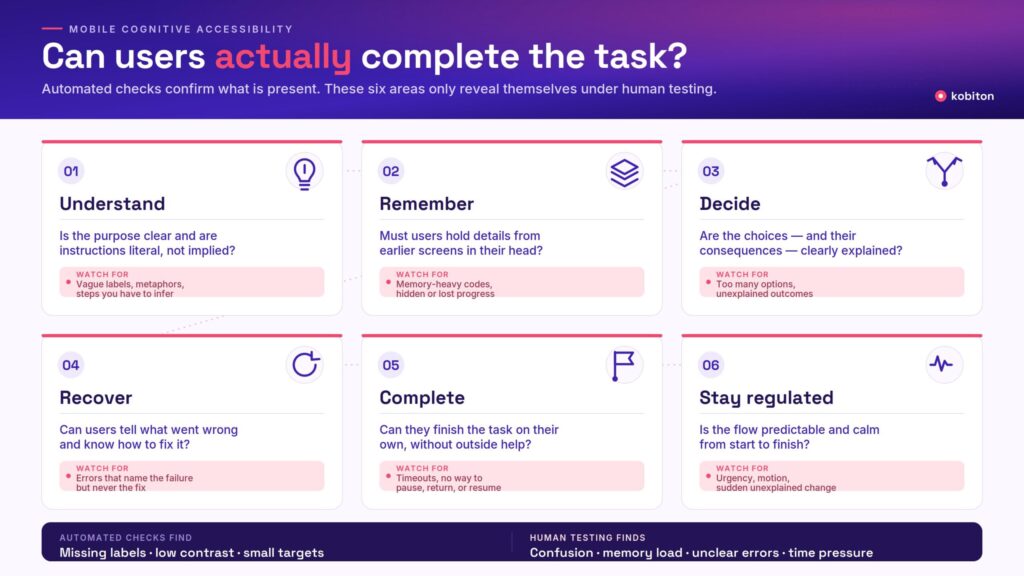
Review each flow across these areas:
- Understand: Is the purpose clear? Are instructions literal and specific? Are icons, labels, and actions explained well enough?
- Remember: Does the user need to hold information from previous screens in memory? Is progress visible? Is context preserved?
- Decide: Are choices clear? Are consequences explained? Are options presented without overwhelming the user?
- Recover: Are errors written clearly? Does the user know what went wrong and how to fix it? Can they recover without starting over?
- Complete: Can the user finish the task without help? Are time limits adjustable? Does the flow support interruptions or returns?
- Stay regulated: Is the experience predictable and manageable? Are there avoidable distractions, urgency, motion, or confusing changes?
A flow that passes technical checks may still need cognitive accessibility review if users cannot understand what is happening or complete the task with confidence.
Final takeaway
Cognitive accessibility is where “technically present” and “actually understandable” part ways.
A mobile app can have the right labels, buttons, contrast, and layout while still asking too much of the user. It may require too much memory, too much interpretation, too much recovery, or too much speed.
Automated checks can help teams find important technical issues, but they cannot fully measure cognitive load. They cannot tell whether instructions are clear enough, whether an error is recoverable, whether a timer creates pressure, or whether a user can complete a real task without help.
That is why cognitive accessibility needs human testing.
The goal should be to ensure that your app is understandable, manageable, and usable for the people who need it.
FAQ
What is cognitive accessibility?
Cognitive accessibility is the practice of making digital experiences easier to understand, remember, navigate, and complete for people with cognitive and learning disabilities. It includes factors such as clear language, predictable navigation, visible progress, recoverable errors, flexible timing, and reduced memory load.
Why does cognitive accessibility need human testing?
Cognitive accessibility needs human testing because many barriers only appear when a person tries to complete a real task. Automated tools can find some technical issues, but they cannot fully measure confusion, memory burden, cognitive load, unclear instructions, or how difficult it is for someone to recover from an error.
Can automated accessibility tools test cognitive load?
Automated tools can support cognitive accessibility testing, but they cannot fully validate it. They can help identify issues such as missing labels, poor contrast, or small touch targets. Human review is still needed to evaluate whether the flow is understandable, whether instructions make sense, and whether users can complete the task without unnecessary help.
What are examples of cognitive accessibility barriers in mobile apps?
Examples include unclear instructions, inconsistent navigation, complex multi-step forms, vague error messages, timeouts, memory-heavy authentication, distracting motion, hidden progress, unfamiliar icons, and workflows that require users to infer too much. These barriers can make an app difficult or impossible to use even when the interface appears technically correct.
How can teams test cognitive accessibility in mobile apps?
Teams can test cognitive accessibility by asking people to complete real tasks while observing where they get confused, lose context, make errors, or need help. Teams should review clarity, timing, memory load, decision points, error recovery, and whether the task can be completed independently. Testing with people with cognitive and learning disabilities provides the strongest insight.
Does WCAG cover cognitive accessibility?
WCAG includes requirements and guidance that support cognitive accessibility, such as enough time, clear structure, error identification, and predictable interactions. However, W3C also provides supplemental guidance for people with cognitive and learning disabilities because cognitive accessibility often requires additional design and usability considerations beyond technical conformance.
How does cognitive accessibility affect mobile users?
Cognitive load is the amount of mental effort a person needs to understand and complete a task. In accessibility testing, high cognitive load can come from unclear instructions, too many steps, memory demands, time pressure, distracting content, or confusing error recovery. Human testing helps teams see where the interface asks users to work too hard.