
Modern mobile teams are expected to release updates rapidly without compromising app speed, responsiveness, or stability. Mobile Performance Testing is essential in CI/CD pipelines, helping teams identify slowdowns, crashes, and resource issues before they affect users.
This guide explains how to integrate performance testing into CI/CD workflows, the role of real-time monitoring, and how teams can build a reliable, scalable strategy using platforms like Kobiton.
What is Mobile Performance Testing?
Mobile Performance Testing measures how a mobile app behaves under real-world conditions across devices, networks, and workloads. Key metrics tracked include:
- App launch time
- Frame rate (FPS) and UI smoothness
- API/network latency
- CPU, memory, and battery usage
- Crash rates and ANRs (Application Not Responding)
These metrics help detect performance bottlenecks early, ensuring consistent app behavior across releases.
Unlike functional testing, performance testing is data-driven and continuous, making it a natural fit for CI/CD environments.
Why Mobile Performance Testing Matters in CI/CD Pipelines
A CI/CD pipeline automates the process of building, testing, and deploying code, enabling frequent releases. However, without performance testing, pipelines can push inefficient code into production at high speed.
Key benefits of integrating performance testing into CI/CD include:
- Early detection of regressions before deployment
- Continuous validation with every code commit
- Faster feedback loops for developers
- Improved user experience across devices
- Reduced production failures
CI/CD performance testing simulates real-world usage, validating metrics like response time, throughput, and stability throughout the pipeline.
The Role of Real-Time Performance Monitoring
Real-time monitoring takes performance testing a step further by continuously tracking performance during and after test execution.
What Real-Time Monitoring Captures:
- Live CPU, memory, and battery usage
- Network request timings and failures
- UI rendering performance
- Device-specific performance variations
Why It Matters:
- Detects issues as they happen rather than after test completion
- Helps identify intermittent or environment-specific issues
- Enables instant feedback in CI/CD pipelines
- Supports trend analysis over time
Instead of relying solely on pass/fail results, teams gain visibility into how performance evolves across builds.
How Mobile Performance Testing Fits into CI/CD Pipelines
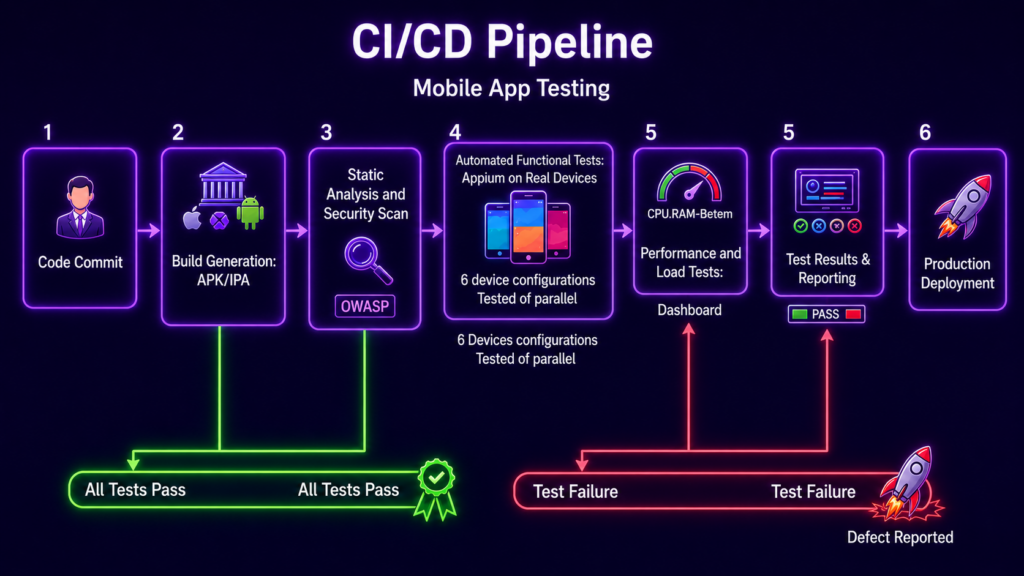
- Continuous Integration (CI) Stage
Lightweight performance checks run on every commit:
- Smoke performance tests (e.g., app launch time)
- API response time checks
- Basic resource usage validation
These tests catch obvious regressions early in the process.
- Build & Test Stage
Once the app is built, automated performance scripts run on real devices, with parallel testing across multiple devices and OS versions. Real-time monitoring captures detailed metrics, with cloud-based device testing providing scalability without the need for hardware.
- Continuous Delivery (CD) Stage
Before deployment, perform:
- Load testing for peak conditions
- Network simulation (3G, 4G, and poor connectivity)
- Long-running (soak) tests to detect memory leaks
- Post-Deployment Monitoring
After release, real-time monitoring continues in production, triggering alerts for any performance degradation. Data is fed back into the CI/CD pipeline for ongoing improvements.
Key Metrics to Track in Mobile Performance Testing
To make performance testing actionable, focus on measurable KPIs:
- App-Level Metrics
- Launch time
- Screen load time
- FPS (frame rendering performance)
- Network Metrics
- API latency
- Request/response time
- Error rates
- Device Metrics
- CPU usage
- Memory consumption
- Battery drain
- Stability Metrics
- Crash rate
- ANR occurrences
Tracking these consistently helps identify performance trends and prevent gradual declines.
Real Device Testing vs Emulators
- Emulators
- Faster and cheaper
- Limited accuracy for performance metrics
- Real Devices
- Accurate, hardware-level insights
- Reflect real-world user conditions
- Detect device-specific issues
Using real-device cloud platforms, like Kobiton, allows teams to scale performance testing without maintaining physical labs.
Best Practices for Mobile Performance Testing in CI/CD
- Shift Performance Testing Left
Run lightweight tests early in the pipeline to catch issues quickly.
- Use Parallel Testing
Execute tests across multiple devices simultaneously to reduce feedback time.
- Define Performance Thresholds
Set clear benchmarks (e.g., app launch < 3 seconds) to ensure performance meets expectations.
- Monitor Trends, Not Just Failures
Track performance over time to identify gradual degradation rather than only focusing on test failures.
- Separate Test Layers
Run quick checks in CI and deeper performance tests in nightly builds.
- Integrate with Developer Workflows
Send results directly to GitHub, Slack, or CI dashboards for faster action.
Common Challenges and Solutions
- Slow Test Execution
Solution: Use parallel testing and prioritize critical flows. - Flaky Results
Solution: Run tests on real devices and stable environments. - High Infrastructure Costs
Solution: Use cloud-based device testing platforms. - Lack of Visibility
Solution: Implement real-time monitoring dashboards.
How Kobiton Supports Mobile Performance Testing
Kobiton provides a practical solution for integrating performance testing into CI/CD pipelines:
- Real-device cloud for accurate testing
- AI-driven automation to reduce test maintenance
- Integration with CI/CD tools like Jenkins and GitHub Actions
- Real-time insights into app performance
Kobiton enables teams to test continuously without slowing down release cycles, ensuring better performance with every update.
Future Trends in Mobile Performance Testing
- AI-based anomaly detection in performance metrics
- Predictive performance analysis before deployment
- Deeper integration with DevOps observability tools
- Increased reliance on real-time monitoring in pipelines
Conclusion
Mobile Performance Testing is now essential in modern CI/CD workflows. As release cycles accelerate and user expectations rise, teams must continuously monitor app performance.
By combining automated testing, real-device validation, and real-time monitoring, teams can identify issues early, maintain app quality, and deliver smoother user experiences—without delaying development.