iOS signing in Kobiton environments involves three related tasks: understanding how iOS code signing works, generating signing certificates and provisioning profiles, and importing those files into a device host.
This guide focuses on understanding how iOS signing works. For related tasks, see the guides listed in Related guides at the end of this document.
Overview
iOS requires both code signing and provisioning before an app can run on a device. In Kobiton environments, this affects how iOS devices are prepared for hosting, automation, app re-signing, and device management.
Before an iOS app can run on a device, it must:
- Be signed with a valid Apple-issued certificate
- Match a provisioning profile that authorizes the app on the target device
This guide explains the technical role of code signing, certificates, and provisioning profiles, how they work together, and the common issues that can prevent a signed app from running.
Why iOS requires code signing
iOS does not allow unsigned code to run. Before an app can launch, the operating system verifies that it has been properly signed.
In Kobiton environments
iOS code signing requirements still apply when devices are hosted in a Kobiton device lab. Automation tools, device hosting services, and re-signing workflows all operate within Apple’s security model. Apps must still be signed with valid certificates before they can be installed or executed on hosted devices.
Code signing confirms two things:
- Identity: the app was signed by a recognized developer using a valid Apple-issued certificate
- Integrity: the app has not been modified since it was signed
If the app’s contents change after signing, the signature no longer matches and iOS rejects the app.
Apple enforces this at the operating system level. Users, testing tools, and automation frameworks do not bypass this requirement.
How iOS code signing works
Code signing occurs during the build process.
When an app is built, Xcode uses a private key stored on the signing machine to generate a digital signature. That signature is embedded in the app bundle. When the app is installed or launched, iOS verifies:
● the app has been signed
● the signature matches the app’s current contents
● The signing certificate is valid and trusted by Apple
If any of these checks fail, the app will not run.
Code signing establishes identity and integrity. It does not determine whether the app is authorized to run on a specific device. That is handled by the provisioning profile.
What is an iOS certificate?
An iOS certificate is a digital document issued by Apple that verifies a developer’s identity.
When a developer enrolls in the Apple Developer Program, a public and private key pair is generated. Apple issues a certificate that associates the public key with the developer account. That certificate is then used as part of the trust chain that allows iOS devices to validate signed apps.
Certificates are used to sign apps in a way that Apple devices can trust. They establish who signed the app, but they do not determine where the app is allowed to run.
Certificate types
There are two main certificate categories used in iOS signing workflows:
Development certificate
Used during development and testing. This certificate signs apps that run on registered development devices.
Distribution certificate
Used for broader distribution scenarios, including App Store, Ad Hoc, and Enterprise distribution.
What is a provisioning profile?
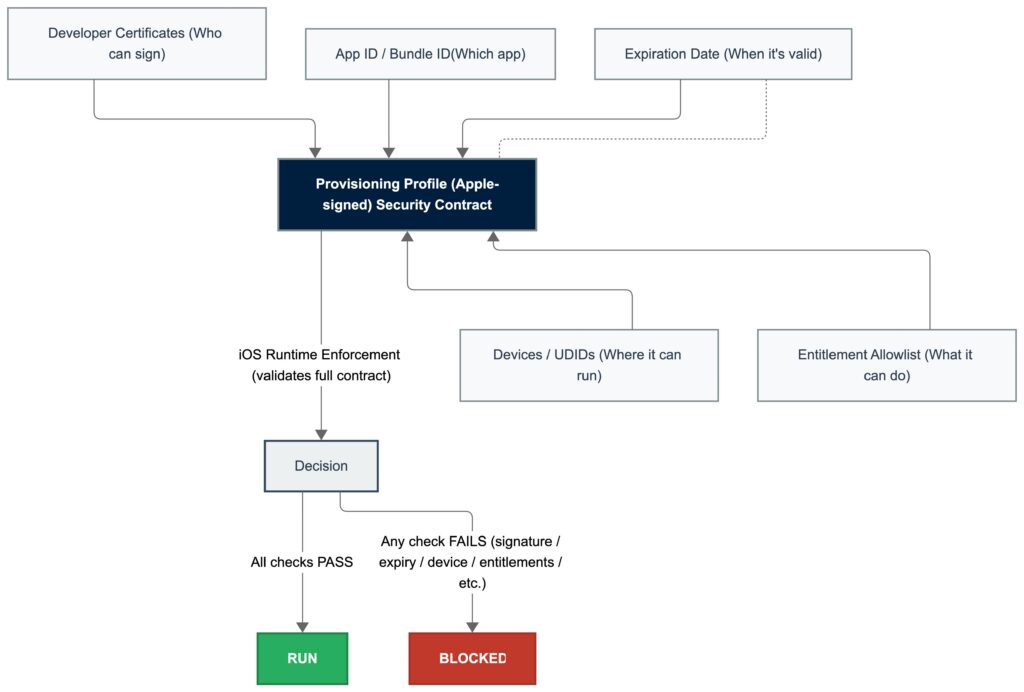
A provisioning profile is a configuration file that determines whether a signed app is authorized to run on a specific device.
A provisioning profile typically links:
● an App ID
● one or more valid signing certificates
● a list of device UDIDs, when required
● enabled entitlements or capabilities
When an app is installed or launched, iOS checks not only the signature and certificate, but also whether the provisioning profile permits the app to run on that device.
If certificates establish identity, provisioning profiles establish authorization.
In Kobiton environments
When hosting iOS devices in a Kobiton device lab, provisioning profiles determine which apps can run on those devices. Development and Ad Hoc provisioning profiles typically include the UDIDs of the hosted devices so that signed apps can be installed for testing and automation workflows.
Provisioning profile types
Development provisioning profile
Used during development and testing. Requires a development certificate and includes registered device UDIDs.
Ad Hoc provisioning profile
Used to distribute an app outside the App Store to a limited set of registered devices. Requires a distribution certificate and includes device UDIDs.
App Store provisioning profile
Used when submitting an app to the App Store. Requires a distribution certificate and does not include device UDIDs.
Enterprise provisioning profile
Used by organizations in Apple’s Enterprise Program to distribute internal apps without App Store submission. Does not require listing individual device UDIDs.
How certificates and provisioning profiles work together
An iOS app must satisfy two independent checks before it can run:
● Identity check: the certificate allows iOS to verify who signed the app and whether the signature is valid
● Authorization check: the provisioning profile determines whether the signed app is allowed on the target device
An app will run only if:
● the signing certificate is valid
● the provisioning profile includes the certificate
● the provisioning profile matches the App ID
● the device is authorized, if the profile type requires device registration
Both pieces are required. A valid certificate without a matching provisioning profile, or a valid provisioning profile without a trusted certificate, is not enough.
In Kobiton environments
Device hosting and automation environments often involve multiple Mac mini hosts and large pools of iOS devices. Maintaining valid certificates and provisioning profiles ensures that hosted devices remain available for testing and that automation workflows can install and run signed apps successfully.
Common code signing errors
Most code signing failures fall into one of four categories:
● invalid or expired certificate
● provisioning profile does not match the certificate
● provisioning profile does not match the App ID
● target device is not authorized in the provisioning profile
No provisioning profile found
This usually means iOS cannot find a provisioning profile that matches the App ID, certificate, or current device.
Code signing failed
This is a general signing error. Common causes include certificate and profile mismatches, invalid signing configuration, or expired certificates.
A valid provisioning profile for this executable was not found
This usually indicates that the current device UDID is not included in the provisioning profile, or the selected provisioning profile does not match the app’s App ID.
Provisioning profile doesn’t include the selected signing certificate
The provisioning profile references a different certificate than the one being used to sign the app.
Certificate expired or revoked
If a certificate has expired or been revoked, iOS fails the identity check, and the app cannot be installed or launched.
What changes in Kobiton environments
In small development workflows, signing and provisioning may be handled once per device or app. In Kobiton environments, these requirements often need to scale across multiple hosted devices, Mac mini hosts, and automation workflows.
This introduces additional operational requirements:
● managing multiple device UDIDs
● maintaining valid certificates across host machines
● keeping provisioning profiles aligned with device inventory
● updating certificates and profiles without interrupting device availability
● ensuring automation and re-signing workflows continue to function after certificate or profile changes
Large device labs may host dozens or hundreds of physical devices. Managing provisioning profiles, device UDIDs, and certificate expiration becomes an operational task rather than a one-time setup step.
In Kobiton environments
Device hosting platforms must maintain valid certificates and provisioning profiles across the device lab so that hosted devices remain available for testing, automation, and app installation. Proper certificate and profile management helps prevent interruptions to testing workflows when certificates expire or device inventories change.