Mobile testing produces a huge amount of data across different devices, operating systems, and network conditions. For QA teams, manually reviewing Mobile Test Results takes a significant amount of time and often leads to missed patterns or delayed decisions.
AI-driven analysis is changing how teams handle this data. Instead of manually going through logs, screenshots, and performance metrics, AI tools can process, organize, and highlight meaningful patterns within seconds. This makes it much easier to understand what is happening across test runs and act quickly. This guide explains how automated analysis improves Mobile Test Results handling and how teams can apply it effectively using platforms like Kobiton.
What Are Mobile Test Results?
Mobile Test Results refer to the data generated after running tests on mobile applications. This data gives teams a clear picture of how the app behaves under different conditions. It usually includes:
- Pass or fail status of each test case
- Error logs and stack traces that show what went wrong
- Screenshots and video recordings for visual context
- Performance metrics such as CPU, memory, and battery usage
- Device-specific behavior insights across different models and OS versions
In large-scale testing environments, especially when using real device clouds, this data grows very quickly. Without automation, reviewing it becomes inefficient and difficult to manage.
Challenges in Manual Test Result Analysis
Before AI-based systems became common, teams struggled with several issues:
Data Overload
Running tests across multiple devices generates thousands of logs, screenshots, and reports. Sorting through this manually is slow and exhausting.
Inconsistent Debugging
Different team members may interpret the same failure in different ways. This leads to confusion and delays in identifying the actual issue.
Slow Feedback Loops
Manual analysis slows down the development cycle, especially in CI and CD pipelines where speed matters.
Hidden Patterns
Recurring issues often go unnoticed because there is no system in place to group or track similar failures over time.
How AI Transforms Mobile Test Results Analysis
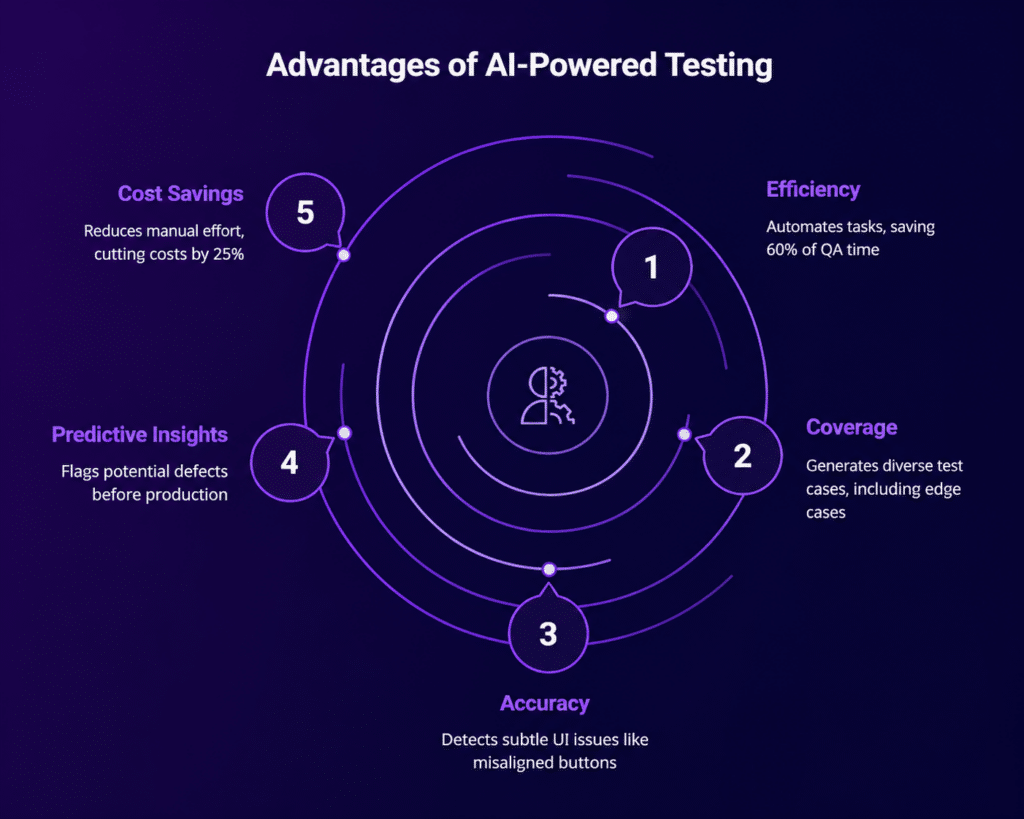
AI introduces a structured and automated way to process Mobile Test Results, making analysis faster and more reliable.
Intelligent Failure Classification
AI groups failures based on patterns such as crashes, UI issues, or network problems. This helps teams quickly understand the type of issue without reading every log.
Root Cause Identification
Instead of just displaying errors, AI analyzes logs and historical data to suggest the most likely cause of a failure. This reduces the time spent on debugging.
Visual Comparison Analysis
AI compares screenshots from different test runs and highlights UI differences automatically. This removes the need for manual visual checks.
Predictive Insights
By learning from previous test runs, AI can highlight which test cases are more likely to fail in the future. This helps teams focus on high-risk areas first.
Key AI Capabilities for Test Result Automation
Log Analysis Using NLP
Natural Language Processing helps interpret error logs and group similar issues together, making it easier to track recurring problems.
Image Recognition for UI Testing
AI scans screenshots to detect layout changes, missing elements, or alignment issues that might affect user experience.
Test Flakiness Detection
AI identifies unstable tests that fail randomly, helping teams separate real issues from unreliable test behavior.
Smart Test Prioritization
Based on past Mobile Test Results, AI suggests which tests should run first, saving time and improving pipeline efficiency.
Workflow: Automating Mobile Test Results Analysis
A simple workflow for implementing AI-based analysis looks like this:
Step 1: Execute Tests on Real Devices
Run automated or manual tests using a real device cloud to get accurate results.
Step 2: Collect Test Artifacts
Gather logs, screenshots, videos, and performance data from each test run.
Step 3: Apply AI Processing
Use AI tools to automatically analyze and categorize the results.
Step 4: Generate Insights
Get clear reports that highlight failures, trends, and unusual patterns.
Step 5: Integrate with CI and CD
Feed these insights into your pipeline so teams can act on them immediately.
Using Kobiton for AI-Driven Test Result Analysis
Kobiton provides features that support automated Mobile Test Results analysis in a practical way:
- Real device testing with detailed session data
- AI-driven insights that help identify failures quickly
- Session Explorer for visual debugging and step-by-step analysis
- Integration with CI and CD tools for continuous feedback
This setup allows teams to move from raw test data to clear, actionable insights without spending hours on manual review.
Best Practices for Implementing AI in Test Analysis
Start with Clean Test Data
Accurate and well-structured data improves the quality of AI analysis.
Standardize Test Cases
Consistent naming and structure make it easier for AI to detect patterns across results.
Combine AI with Human Review
AI speeds up analysis, but human validation is still important for final decisions.
Monitor AI Accuracy
Review AI classifications regularly to maintain reliability and avoid incorrect grouping.
Scale Gradually
Start with critical test suites, then expand AI usage across more projects as confidence grows.
Common Use Cases
Regression Testing
Quickly identify issues introduced after updates without manually checking each test.
Cross-Device Testing
Understand how the application behaves across different devices and operating systems.
Performance Monitoring
Track changes in app performance over time and identify trends early.
CI and CD Optimization
Reduce delays in pipelines by automating the analysis of test results.
Future Trends in Mobile Test Results Automation
AI in testing is evolving rapidly, with new capabilities such as:
- Self-healing test scripts that adjust automatically when UI changes
- Automated test generation based on app behavior
- Real-time anomaly detection during test execution
- Stronger integration with DevOps workflows
These improvements will continue to reduce manual effort and make testing faster and more reliable.
Conclusion
Automating Mobile Test Results analysis with AI tools allows teams to handle large volumes of testing data efficiently. It reduces manual effort, speeds up debugging, and provides deeper visibility into how applications perform.
Platforms like Kobiton make this approach practical by combining real device testing with AI-driven insights. As mobile applications become more complex, adopting AI-based analysis is no longer optional for teams that want faster releases and better product quality.