Mobile automation teams working with Appium often face one persistent issue: tests that fail after small UI changes. This becomes even more complex in cross-platform setups where iOS and Android behave differently at the UI and locator level.
Appium Self-Healing introduces a recovery layer that helps tests continue execution when locators break by dynamically finding alternative element matches using historical and contextual signals.
This guide breaks down how self-healing works, where it helps, and why iOS vs Android differences make implementation more complex than it looks.
What is Appium Self-Healing?
Appium Self-Healing is a mechanism that allows test execution to continue even when a locator fails. Instead of stopping the test at a NoSuchElementException, the system attempts to find the closest matching UI element using:
- Previous successful locator history
- UI structure comparison
- Attribute similarity (text, class, accessibility labels)
- Context from earlier test runs
As shown in real implementations, once an element is successfully identified, its metadata is stored and reused to match future UI states when the original locator breaks.
In simple terms:
If the locator breaks, the system tries to “guess” the same element using learned UI patterns instead of failing immediately.
Why Self-Healing Matters in Appium Automation
Without self-healing, even minor UI changes can cause:
- Broken test runs after every build
- Heavy locator maintenance
- Flaky CI/CD pipelines
- Delayed release cycles
Self-healing reduces this pressure by allowing tests to recover from:
- ID changes
- XPath shifts
- Label updates
- Layout reorganization
However, it does not solve architectural or system-level failures like Appium server crashes or app launch issues.
How Appium Self-Healing Works (Technical Flow)
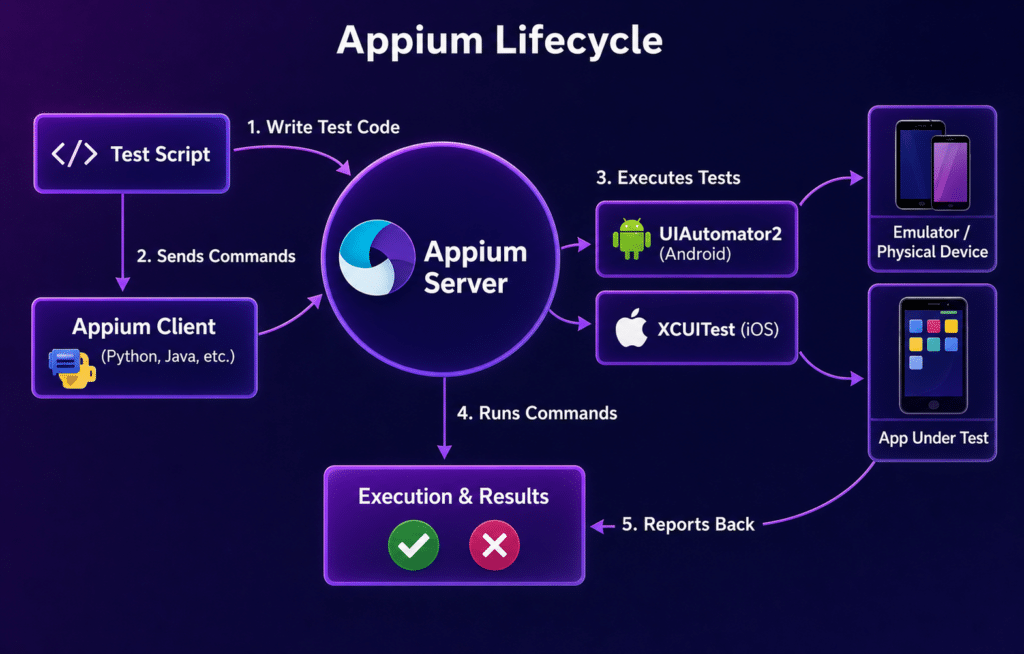
A typical self-healing flow in Appium-based systems looks like this:
1. Baseline Capture (First Run)
- Element is located successfully
- Locator + UI context is stored
- Page structure snapshot is recorded
2. Failure Detection (Next Runs)
- Original locator fails
- Appium flags missing element
3. Candidate Matching
System searches for alternatives using:
- Text similarity
- Relative position in UI tree
- Neighbor elements
- Accessibility metadata
4. Healed Locator Injection
- Best match is selected
- Execution continues using new locator
- Result is logged as “healed”
This process is heavily dependent on historical test data and stable UI patterns.
Cross-Platform Reality: iOS vs Android Differences
Even though Appium supports both platforms under a single framework, self-healing behaves differently due to platform-level UI differences.
1. Locator Strategy Differences
| Area | Android | iOS |
| Primary framework | UIAutomator2 / Espresso | XCUITest |
| Common locators | resource-id, XPath, content-desc | accessibility-id, label, predicate |
| Stability level | Moderate (depends on dev discipline) | Often stricter but less flexible |
These differences directly affect how self-healing models interpret UI structure.
2. UI Tree Structure Variations
- Android UI hierarchy is often deeper and more flexible
- iOS UI hierarchy is flatter but more rigid
Self-healing systems trained on one structure may produce weaker matches on the other.
3. Accessibility Label Inconsistency
Cross-platform apps frequently fail to maintain:
- Matching accessibility IDs
- Consistent naming conventions
- Shared component identifiers
This weakens self-healing accuracy across platforms.
4. Timing and Rendering Differences
- Android may render views asynchronously across devices
- iOS may cache or reuse UI components differently
This causes mismatch in element discovery timing, affecting healing confidence.
5. Framework Execution Differences
Appium routes commands differently:
- Android → UIAutomator2 / Espresso layer
- iOS → XCUITest layer
Each driver interprets UI snapshots differently, which impacts how self-healing models compare elements.
Common Cross-Platform Self-Healing Challenges
1. False Positives (Wrong Element Match)
Self-healing may pick visually similar but functionally different elements.
2. Platform Drift
Same screen behaves differently in iOS vs Android due to:
- UI spacing
- Component hierarchy
- Native widgets
3. Over-Reliance on Historical Data
If earlier runs captured weak locators, healing propagates bad patterns.
4. Hybrid App Complexity
Apps using WebViews introduce mixed locator contexts, making healing less reliable across platforms.
5. CI/CD Overhead
Healing logic adds runtime analysis, which can slightly increase execution time in large test suites.
Best Practices for Appium Self-Healing in Cross-Platform Testing
1. Standardize Locator Strategy Across Platforms
- Prefer accessibility IDs shared across iOS and Android
- Avoid deep XPath dependency
2. Maintain UI Parity Between Platforms
- Align component naming conventions
- Ensure similar hierarchy structure where possible
3. Combine Self-Healing With Strong Page Object Model
Self-healing works best when:
- Page objects are well-structured
- Locators are not overly dynamic
4. Avoid Treating Self-Healing as a Replacement for Good Locators
Self-healing should support, not replace, locator discipline.
5. Monitor Healed Locators in Reports
Always track:
- Which locators were healed
- How often healing occurs
- Which screens are unstable
When Self-Healing Works Best vs Worst
Works Best When:
- Minor UI updates (text, IDs, labels)
- Stable app structure
- Consistent accessibility usage
Works Poorly When:
- Major UI redesigns
- Removed or replaced components
- Dynamic canvas or heavily animated screens
- Poor locator strategy from the start
Strategic Takeaway
Appium Self-Healing is most effective as a stability layer, not a recovery system for poor test design.
In cross-platform testing, its value depends heavily on:
- UI consistency between iOS and Android
- Locator discipline
- Historical execution quality
- Driver-level differences
Final Thought
In real-world mobile QA pipelines, especially at scale, self-healing reduces maintenance pressure—but cross-platform inconsistencies between iOS and Android remain the biggest limiter.
Teams that succeed with it typically combine:
- Strong locator governance
- Shared UI standards
- Controlled healing rules
- Real-device validation platforms (like Kobiton-style device clouds)