People with different abilities, devices, and environments use modern applications. Accessibility is no longer optional for teams. It directly affects usability, legal compliance, and how far a product can reach.
At the same time, traditional accessibility testing is struggling to keep up. Fast release cycles and constantly changing interfaces make it difficult to catch issues early and consistently.
This is where AI Augmented Testing makes a real difference. By combining artificial intelligence with human testing, teams can identify accessibility issues earlier, test at scale, and create experiences that work for everyone.
What is AI Augmented Testing?
AI Augmented Testing is the use of technologies like machine learning, computer vision, and natural language processing within the testing process to support human testers rather than replace them.
In accessibility testing, this approach helps teams:
- Automate repetitive checks
- Identify hidden accessibility gaps
- Provide smart recommendations
- Support continuous testing across devices
Instead of relying only on automation, this method focuses on collaboration. AI handles speed and scale, while human testers focus on usability, intent, and real-world experience.
Why Accessibility Testing Needs AI Augmentation
Traditional accessibility testing has clear limitations:
- Manual audits take time and slow down releases
- Rule-based tools often miss context-driven issues
- Scaling tests across devices and platforms is difficult
AI helps address these gaps by:
- Running large-scale automated scans
- Identifying patterns across UI elements
- Simulating real user interactions
- Providing feedback during development
This allows teams to move faster while improving the depth and quality of testing.
How AI Augmented Testing Works in Accessibility
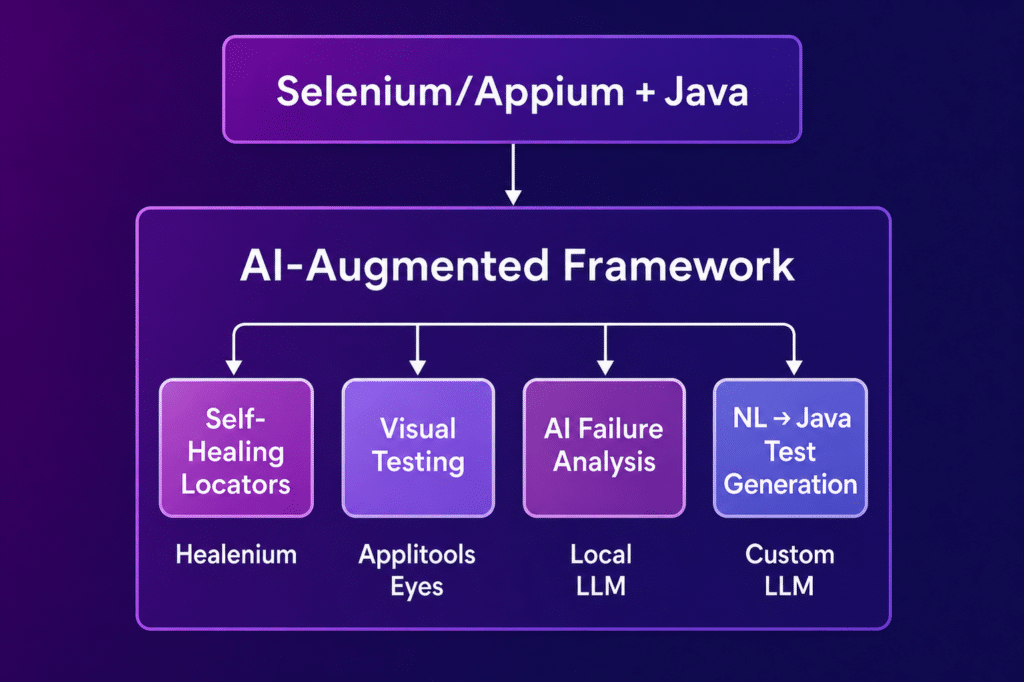
1. Intelligent Issue Detection
AI scans user interfaces and detects common accessibility problems such as:
- Missing alt text
- Poor color contrast
- Incorrect heading structures
It can also prioritize issues based on severity, helping teams focus on what matters most.
2. Automated Test Case Generation
AI analyzes how an application behaves and creates accessibility-focused test scenarios, including:
- Keyboard navigation flows
- Screen reader compatibility
- Form usability checks
This increases coverage without adding extra manual effort.
3. Assistive Technology Simulation
AI can simulate how users interact with applications through:
- Screen readers
- Voice commands
- Keyboard-only navigation
This helps reveal usability gaps that static tools often miss.
4. Computer Vision for UI Accessibility
With visual analysis, AI can detect:
- Layout inconsistencies
- Missing labels in images
- Weak visual hierarchy
It can also generate alt text using image recognition, which is useful when managing large volumes of content.
5. Natural Language Processing for Content Accessibility
AI evaluates written content by analyzing:
- Readability levels
- Clarity of instructions
- Accuracy of labels
This is especially helpful for users with cognitive challenges, where simple and clear content makes a big difference.
6. Continuous Accessibility Testing in CI CD
AI can be integrated into development pipelines to:
- Run checks on every build
- Provide immediate feedback to developers
- Support early testing during development
This reduces the need for last-minute fixes and improves overall product quality.
Key Benefits of AI Augmented Testing for Accessibility
Faster Testing Cycles
AI reduces the time spent on repetitive tasks, allowing teams to test more frequently.
Improved Accuracy
Context-aware detection helps reduce false alerts and highlights meaningful issues.
Scalable Across Devices
AI can test multiple screen sizes and environments at the same time.
Better Compliance
Supports standards such as:
- WCAG
- ADA
- European Accessibility Act
Real-Time Feedback
Developers get insights during development instead of after release.
Increased Test Coverage
AI can explore more scenarios than manual testing alone, leading to better overall coverage.
Limitations of AI in Accessibility Testing
AI Augmented Testing is powerful, but it is not complete on its own.
Limited Context Understanding
AI can detect the presence of alt text but may not fully understand whether it is meaningful or useful.
Risk of False Results
AI may sometimes flag valid designs or miss edge cases that require human judgment.
Bias in AI Models
If trained on limited datasets, AI systems may struggle with diverse user needs, accents, or non-standard interactions.
Over Reliance on Automation
Relying only on AI can lead to missed usability issues. Human validation is still necessary for accurate results.
Best Practices for Implementing AI Augmented Testing
Combine AI with Human Testing
Use AI for detection and suggestions, while humans validate and assess real user experience.
Integrate Early in Development
Run accessibility tests during development so issues are caught before deployment.
Focus on High Impact Areas
Prioritize:
- Navigation barriers
- Screen reader compatibility
- Form usability
Use Real Devices for Validation
AI insights should always be validated on real devices to reflect actual user conditions. Platforms like Kobiton make it easier to test accessibility in real-world environments.
Continuously Improve AI Models
Accuracy improves over time when AI is trained with real testing data and updated accessibility standards.
AI Augmented Testing with Real Device Testing
AI Augmented Testing becomes significantly more effective when combined with real device testing platforms like Kobiton.
This combination allows teams to:
- Validate accessibility under real device conditions
- Test gestures, touch interactions, and hardware behavior
- Capture actual user experience instead of relying only on simulations
AI helps identify issues quickly, while real devices confirm how those issues impact real users. Together, they create a more reliable accessibility testing process.
Future of AI Augmented Accessibility Testing
The next phase of AI Augmented Testing will focus on:
- Self-healing accessibility tests
- Predictive issue detection
- Personalized accessibility testing based on user behavior
- Stronger integration with assistive technologies
AI will gradually move from simply identifying problems to helping prevent them before they occur.
Conclusion
AI Augmented Testing is changing how teams approach accessibility. It brings speed, scale, and smarter insights into the testing process, helping teams identify issues earlier and build applications that work for a wider audience.
At the same time, AI alone is not enough. The best results come from combining AI capabilities with human judgment and real device validation.
For teams working on modern applications, accessibility testing supported by AI is quickly becoming a standard part of quality assurance rather than an optional step.