Dec 4, 2020
Sneak Preview: Taking Visual Testing to the Next Level

Adam Creamer
Read More
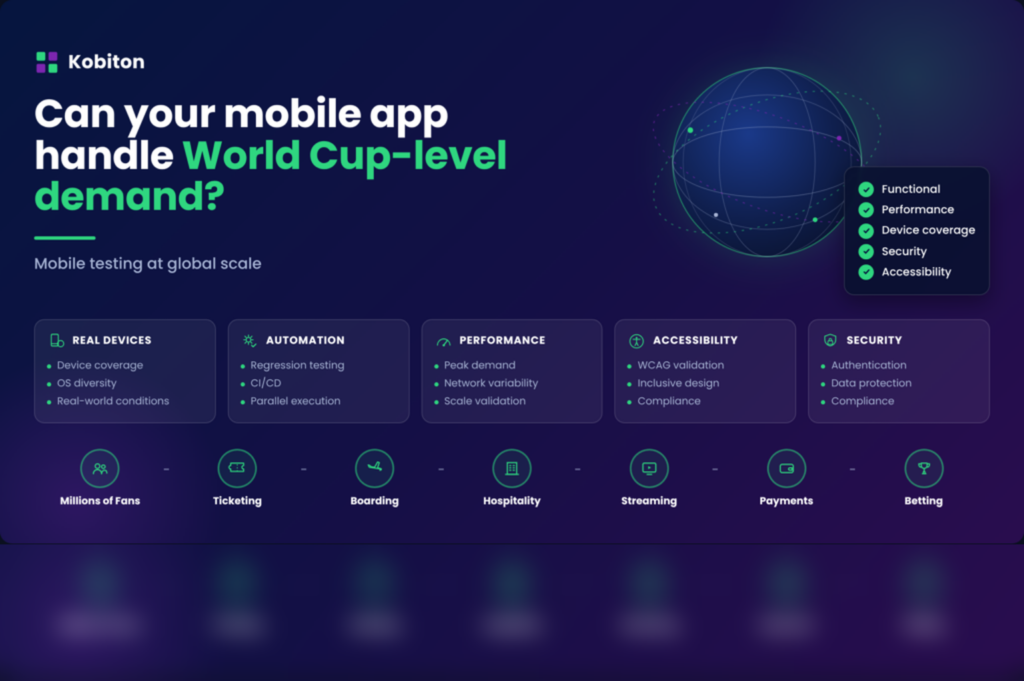
Most demand spikes are a surprise. This one isn’t, and that changes everything about how you should approach mobile app testing.
The 2026 FIFA World Cup will be the largest tournament ever staged: 48 teams, 104 matches, across the United States, Canada, and Mexico. Those numbers matter to fans. They should matter just as much to the people who run mobile engineering, because every ticket scan, boarding pass, hotel check-in, payment, streaming session, and live wager during that month depends on a mobile app working under pressure it rarely sees.
What makes this different from a normal outage is that nobody can claim they were caught off guard. Organizations have known for years when the tournament starts, where it’s hosted, and roughly when usage will spike. The job isn’t responding to the unexpected. It’s preparing for demand everyone can see coming.
For airlines, hotels, ticketing platforms, payment processors, streaming services, and betting apps, the World Cup is a stress test of digital readiness. And in my experience, failures during events like this almost never come from a lack of awareness. They come from testing strategies that never validated the conditions customers actually hit. The teams that come through it well won’t be the ones with the fastest incident response. They’ll be the ones who spent months testing the journeys that matter most.
Most mobile systems are built around average conditions. A World Cup match is not an average condition.
Unexpected outages start with a surprise: a cloud provider goes down, a third-party service disappears, a defect slips through. Teams scramble in real time because they had no warning. A known demand event flips that. You know traffic, transactions, and support volume will all climb, and you know exactly when. The challenge shifts from incident response to preparation.
The same logic applies to Black Friday, Cyber Monday, major product launches, streaming premieres, and seasonal travel peaks. The question is never whether demand arrives. It’s whether you validated the app for the load you knew was coming.
Picture a single match kicking off. Travelers open airline apps at once. Fans pull up digital tickets. Streaming subscribers join the broadcast. Bettors place wagers within seconds of a goal. Payment systems process a surge of transactions. On a quiet Tuesday a small performance issue goes unnoticed. During that match, the same issue hits thousands of customers in minutes. When the spike is predictable, the failure is hard to explain.
Monitoring and alerting matter, but they only tell you a problem has already arrived. Preparation is the part that prevents it: validating the workflows customers depend on before the demand shows up, and understanding how the app behaves across the devices, networks, and operating systems your real users bring.
Device diversity is one of the most underestimated parts of World Cup-scale demand. Millions of users won’t show up on the same phone, OS, or connection. Some arrive on the newest flagships. Plenty more are on three-year-old Android devices that are still common in regional markets. A single traveler might move between airport Wi-Fi, hotel networks, and cellular in one trip.
A customer buying a ticket on a flagship and a customer validating that same ticket on an aging Android both expect it to work. Neither cares which device configuration your team happened to test on.
These problems run deeper than screen sizes. Consider a traveler pulling up a boarding pass with biometric auth, then switching from Wi-Fi to cellular while walking to the gate. Or a fan scanning a QR code at a stadium entrance while thousands of people do the same thing at once. Those workflows only succeed when the camera, authentication, push notifications, OS behavior, network handoffs, and app responsiveness all hold together.
Industries especially exposed to device fragmentation include:
| Industry | Critical mobile workflow |
| Airlines | Boarding passes |
| Hospitality | Mobile check-in |
| Ticketing | Entry validation |
| Banking | Payment authorization |
| Streaming | Live content delivery |
| Sports Betting | Real-time wagers |
Testing on emulators or a narrow set of devices leaves blind spots, because real users experience the app on real hardware. The more geographically diverse your audience, the more those gaps matter. Global events expose weaknesses that stay hidden under normal load.
A global consumer app we work with makes this concrete. Its testing spans a device range that runs from current flagships all the way back to hardware with as little as 512MB of memory, across dozens of Android OEMs and older OS versions, because that spread is what its users actually carry. The team there is quick to point out that fragmentation today is about far more than screen sizes. Manufacturers keep shipping their own forks of Android, from ColorOS to HarmonyOS, and each one can behave a little differently. Simulators and a small in-house device pool got them part of the way, but the combinations they truly needed to cover only surfaced once they tested on a broad pool of real devices.
The biggest mistake teams make in mobile app testing before a major event is trying to test everything at the same intensity. The better move is to name the journeys that simply cannot fail and pour your effort there.
Transactions and payments top that list. A checkout failure hits revenue immediately, whether the user is booking a room, buying merchandise, funding a betting account, or purchasing a ticket. Teams tend to test the happy path and skip the edge cases that high demand exposes fast: interrupted connectivity, expired sessions, payment retries, authentication timeouts.
This is not hypothetical for 2026. In late May, a checkout error in the World Cup ticketing system let roughly 60 fans complete purchases for $0 when transactions skipped the final payment step, and FIFA had to cancel the orders and ask those fans to pay the correct price. A payment path that quietly bypasses the charge is exactly the kind of edge case that slips past a happy-path test and surfaces under real conditions.
Authentication comes next, because customers often log in under stress, standing outside a venue, rushing through an airport, or trying to start a stream minutes before kickoff. An auth failure is uniquely frustrating since it blocks every downstream experience. Biometrics, multifactor authentication (MFA), password recovery, and account verification all deserve dedicated validation well before the spike. A large commercial airline we work with is putting biometric login through exactly this kind of dedicated validation, because a fingerprint or face-scan failure at the gate is the sort of issue that never surfaces in a quick functional check but absolutely surfaces in a crowded terminal.
Then there are the time-sensitive workflows that become useless when delayed: mobile boarding passes, stadium ticket validation, live betting, itinerary updates, payment authorizations. These should get continuous automated validation throughout the release cycle. The goal isn’t just confirming they function. It’s confirming they hold up under the exact conditions customers will hit at peak.
Large events draw large audiences, and large audiences include users with different abilities, devices, and languages. Accessibility often gets treated as a compliance step. During a high-demand event it’s a customer experience requirement. If a visually impaired user can’t retrieve a boarding pass or finish a purchase because of an accessibility barrier, the problem isn’t theoretical. It’s measurable, and it’s happening at the worst possible moment.
This isn’t hypothetical. A large commercial airline we work with has made screen reader testing a standing part of its release process, validating VoiceOver and TalkBack navigation on real devices against WCAG 2.1 and ADA requirements. The reason they keep returning to is a simple one: any traveler who wants to use the app independently should be able to, whether they’re checking a flight, pulling up a boarding pass, or paying for a bag. Because they operate internationally, they test against accessibility rules in more than one region, not just one. A major event only raises the stakes, since the audience that shows up is larger and more varied than on a normal day. It’s also a good reminder that screen reader behavior is one of those things that genuinely differs on real hardware versus an emulator, which is why this kind of validation belongs on physical devices.
Worth validating before any major event: screen reader compatibility, color contrast, touch target sizing, keyboard navigation, content labeling, and dynamic content announcements. The W3C’s WCAG 2.1 guidelines are a solid foundation. The practical truth is that apps built to work for more users tend to work better for everyone.
High-demand events attract more than fans. They attract attention from people probing for weaknesses, and they push far more sensitive data through your app: logins, payment details, personal information, location. The workflows carrying the most load are often the ones carrying the most valuable data, which makes them the workflows worth hardening first.
Security testing belongs in the same release-readiness conversation as everything else. That means validating authentication and session handling under load, confirming sensitive data is protected in transit and at rest, hardening the payment paths that move real money, and running vulnerability checks before the spike rather than after an incident. The NIST Digital Identity Guidelines are a useful reference for what robust authentication and session handling should look like under exactly this kind of pressure. The biometric and login testing described earlier is part of this picture, not the whole of it. An event that puts your app in front of millions is the wrong moment to discover a gap an attacker already found.
The best engineering teams treat a major event as a preparation exercise, not a testing emergency, and they start months early.
They scale test execution, because no large organization can validate hundreds of device combinations one at a time. Running tests in parallel across a broad device inventory means faster feedback and cheaper fixes. Most of that automation runs on an open-source framework like Appium, so a full regression suite can finish in hours instead of days. They expand real-device coverage rather than shrinking it, focusing on the device populations and OS versions that reflect actual customers. A boarding pass that renders fine on an emulator can break on a physical device running a different OS build. A scanning workflow that passes in a lab can behave differently once camera permissions, lighting, and network quality vary.
Confidence doesn’t come from a readiness meeting. It comes from mobile app testing results and repeated validation of the workflows customers depend on. In practice, that means expanding real-device coverage, growing automated regression coverage, executing in parallel, wiring testing into continuous integration and delivery (CI/CD), running accessibility checks, and hardening the security of high-risk workflows before every major release. Across large testing programs, the issues that surface tend to be exactly the ones that only appear once you test beyond your standard regression set: device-specific behavior, auth failures, accessibility defects, workflow interruptions.
It helps to set objective readiness criteria before the event:
| Validation area | Key question |
| Functional testing | Does the workflow work? |
| Device coverage | Does it work across real devices? |
| Performance | Does it work under load? |
| Accessibility | Can every user complete the workflow? |
| Security | Is sensitive data protected under load? |
| Automation | Can regressions be caught quickly? |
Teams that can answer yes to all five walk into a major event with far less operational risk.
The World Cup is just one example. The same lessons apply to Black Friday, Cyber Monday, product launches, travel peaks, and streaming premieres. Before your next high-visibility moment, ask:
That last one is the real lesson. The teams that succeed aren’t the ones with the fastest incident response. They’re the ones who took what they already knew was coming and used the runway to prepare. The next big demand event is already on your calendar. The only open question is whether your testing strategy is ready for it. For a deeper walkthrough of the practices above, see our mobile testing guide.
Disclosure: This article is published by Kobiton. The customer examples are drawn from real engagements and have been anonymized.