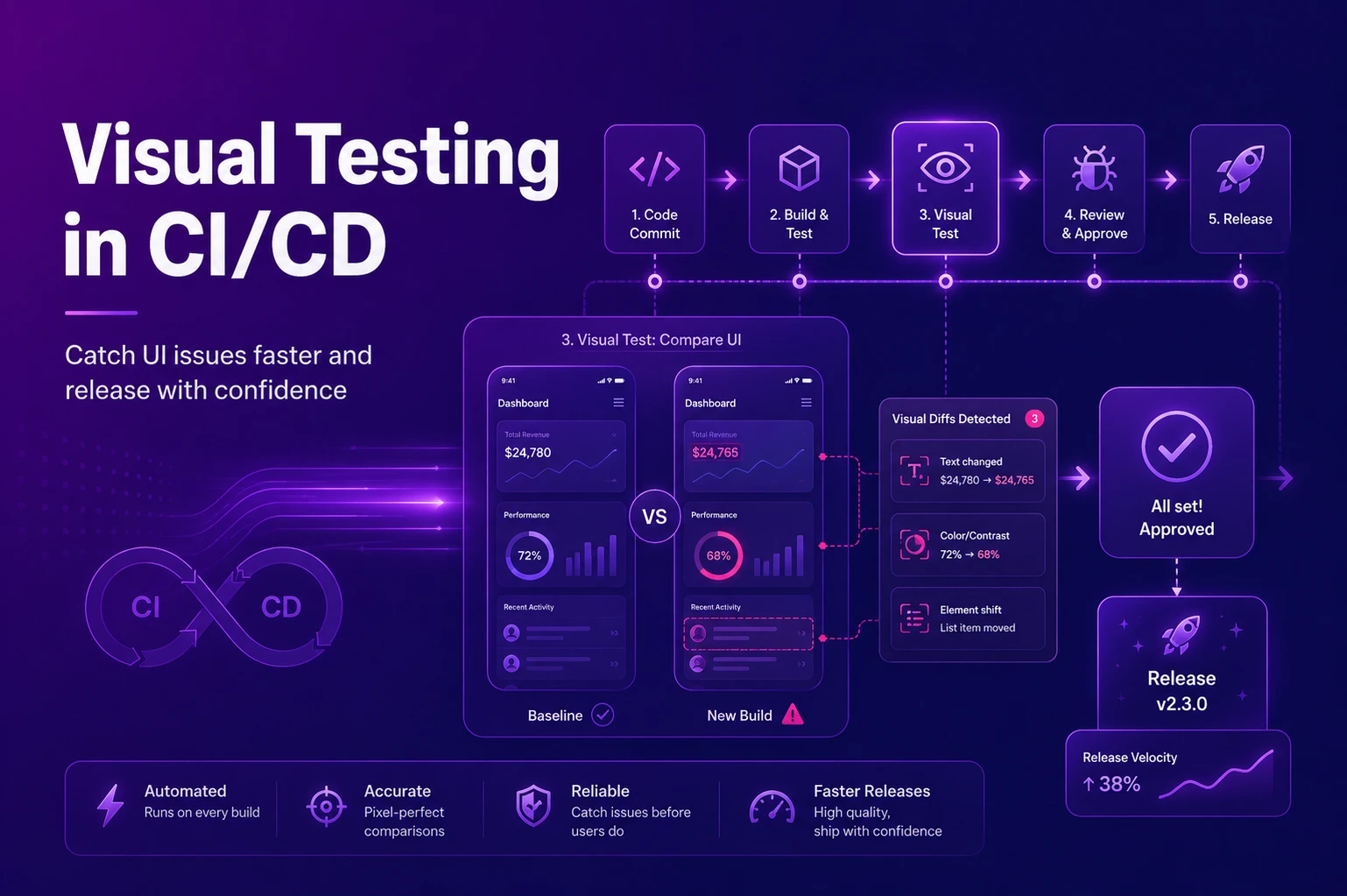
In today’s fast-paced software delivery landscape, releasing features quickly without sacrificing quality is essential. Integrating visual testing in CI/CD has become a powerful strategy for product teams to maintain consistent and bug-free user interfaces.
By automating visual checks as part of the development pipeline, teams can catch UI issues early, reduce manual inspection, and deliver polished experiences faster.
Why Visual Testing Matters in a CI/CD Workflow
Modern applications need to look and function flawlessly across multiple devices, browsers, and screen resolutions. While functional tests validate feature behavior, they can miss visual flaws such as misaligned elements, font inconsistencies, or rendering glitches.
Visual regression testing compares new builds against a baseline snapshot to detect unintended visual changes. Integrated into CI/CD pipelines, these tests run automatically after each code commit or before deployment, flagging differences for review before reaching users.
Automated Visual Testing for Speed and Accuracy
Manual UI checks are time-consuming and prone to human error. Automated visual testing removes this bottleneck by capturing and comparing screenshots across different environments in seconds, ensuring design integrity even with frequent code changes.
Automated visual tests can be configured to ignore irrelevant variations like dynamic ads or timestamps while highlighting critical UI changes that affect user experience. This makes them ideal for fast-paced agile teams working within CI/CD pipelines.
Tools That Make Integration Seamless
Choosing the right visual testing tools is key for smooth CI/CD adoption. Many modern platforms offer native support for CI/CD systems like Jenkins, GitHub Actions, and GitLab CI.
Popular tools include Appium automated visual checks for mobile apps, enabling cross-device UI validation on iOS and Android.
Cloud-based platforms such as LambdaTest and Applitools integrate with functional testing frameworks like Selenium, Cypress, and Playwright to perform visual comparisons at scale.
These tools often provide APIs and plugins for easy setup, ensuring visual tests become a natural part of your existing pipeline.
Steps to Integrate Visual Testing into Your CI/CD Pipeline
Define the Scope: Identify critical UI components such as navigation bars, buttons, or checkout flows where visual consistency is crucial.
Create Baseline Images: Capture initial screenshots of the correct UI state for each target device, browser, and resolution. These serve as reference points for future comparisons.
Set Up Test Automation: Implement automated visual testing scripts within your existing test framework. Use pixel-by-pixel analysis, DOM comparison, or AI-driven validation to detect meaningful changes.
Integrate with the CI/CD Pipeline: Configure your pipeline so visual tests run automatically during build or pre-deployment stages. Any discrepancies should be flagged for review before merging changes.
Review and Maintain Baselines: Regularly update baseline images when intentional design changes occur. This ensures test results remain accurate and reduces false positives.
Benefits of CI/CD Visual Testing
Faster Release Cycles – Automated visual checks run in parallel with functional tests, reducing QA time.
Higher UI Quality – Maintaining consistent visual standards across all platforms builds user trust.
Early Bug Detection – Visual issues are identified during development, avoiding costly post-release fixes.
Reduced Manual Effort – Engineers and QA teams spend less time on repetitive visual inspections.
Final Thoughts
Integrating visual testing into CI/CD pipelines is essential for teams that prioritize speed and quality. Visual regression testing, automated visual checks, and robust CI/CD-compatible tools help development teams confidently deliver updates without compromising the user experience.
Whether validating web interfaces or performing Appium automated visual checks on mobile devices, embedding visual testing into your CI/CD workflow ensures that every release is not only functional but visually flawless.
FAQs
What is visual testing in CI/CD?
Visual testing in CI/CD means automatically checking the app or website UI during the development pipeline to catch design or layout issues before release.
Why is visual regression testing important?
Visual regression testing helps detect unwanted UI changes, such as broken layouts, misaligned buttons, font issues, or rendering problems.
How does automated visual testing speed up releases?
It reduces manual UI checks by automatically comparing screenshots across devices, browsers, and screen sizes.
Which tools can be used for visual testing in CI/CD?
Common tools include Appium, Applitools, LambdaTest, Selenium, Cypress, and Playwright.