
In today’s fast-paced mobile app development environment, visual testing for mobile apps has become essential for ensuring a seamless user experience. While functional testing focuses on whether an app works as expected, visual testing addresses a different but equally important concern: how the app looks. It helps identify visual bugs in mobile apps, ensuring that every UI element appears correctly across different devices, screen sizes, and operating systems.
What Are Visual Bugs in Mobile Apps?
Visual bugs in mobile apps are design-related issues that affect the app’s appearance rather than its functionality. These issues can include misaligned text, broken or missing images, improperly displayed buttons, or UI components that overlap or disappear entirely.
Although these bugs may not stop the app from functioning, they can significantly impact the user experience. Even minor visual inconsistencies can make an app feel unpolished or unreliable, ultimately reducing its overall appeal.
The Importance of Detecting Visual Bugs
Even small visual defects can lead to a frustrating user experience. Users expect apps to be both functional and visually polished. When design elements such as fonts, buttons, or images appear misaligned or incorrectly rendered, users may perceive the app as unreliable or poorly built.
The impact of visual bugs on user experience can be substantial. In many cases, users may abandon the app altogether. For developers and businesses, this results in lost customers, negative reviews, and long-term damage to the app’s reputation.
How Visual Testing Helps Detect UI Bugs
This is where visual testing for mobile apps becomes critical. Visual testing involves validating the appearance of an app across different devices, operating systems, and screen resolutions. It works by comparing the expected visual output, based on design specifications, with the actual output displayed by the app to identify any inconsistencies.
Traditional testing tools often miss these issues because they primarily focus on functionality. In contrast, visual testing tools for mobile apps are specifically designed to evaluate the presentation and layout of UI elements. They ensure that the app’s interface remains consistent and aligned with the intended design, regardless of the platform or device being used.
Automated Visual Testing for Mobile Apps: A Game Changer
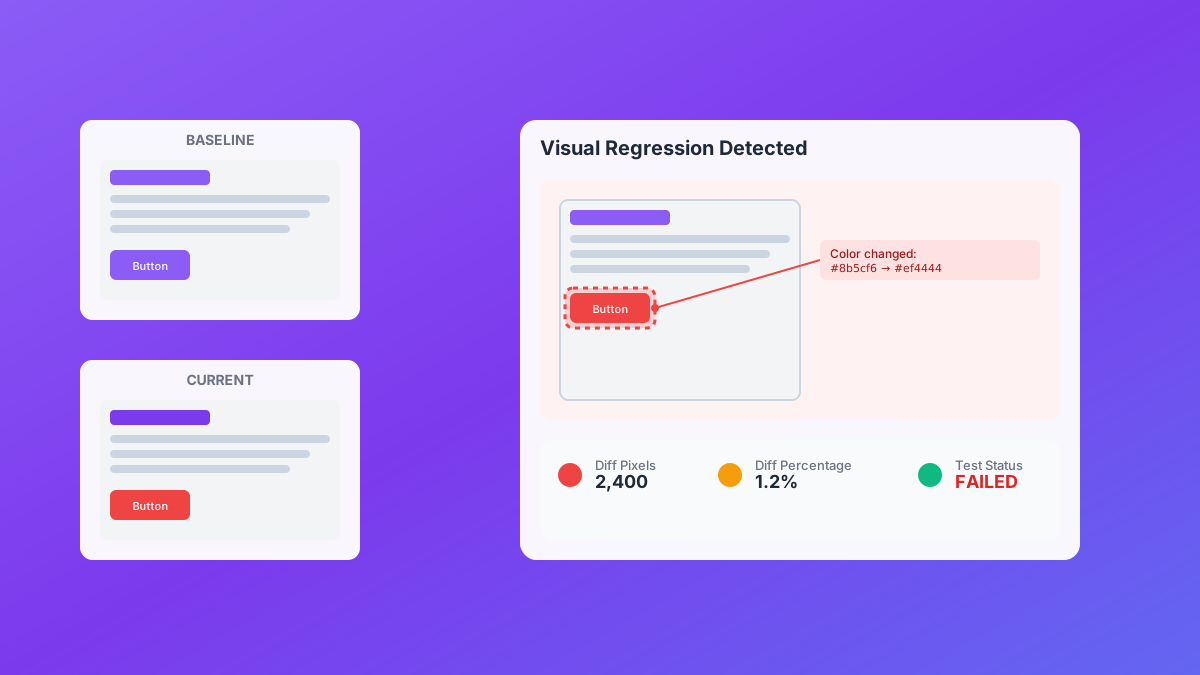
One of the biggest advantages of automated visual testing for mobile apps is its ability to quickly and accurately detect visual bugs without relying on manual inspection. Manual testing can be time-consuming and prone to human error, especially when testing across multiple devices and screen sizes.
Automated tools, however, perform pixel-level comparisons to identify even the smallest visual discrepancies. For example, when a new app update is released, visual testing tools can automatically compare screenshots from previous and current versions to detect unintended visual regressions.
This allows teams to quickly identify issues such as changes in layout, fonts, colors, or spacing. As a result, automation not only speeds up the testing process but also reduces human error and ensures that visual bugs are caught before they reach end users.
Key Features of Visual Testing Tools for Mobile Apps
Several visual testing tools for mobile apps can be integrated into your development pipeline. These tools use advanced technologies such as image comparison and machine learning to detect visual issues efficiently.
Some key features include:
Cross-device testing
These tools test your app across a wide range of devices, operating systems, and screen resolutions to ensure a consistent user interface.
Pixel-by-pixel comparison
They compare screenshots in detail to detect even the smallest differences in UI elements, such as spacing, alignment, or button size.
Regression testing
They automatically identify and report visual regressions that occur after updates or code changes.
Real device testing
Many tools support testing on real devices, providing accurate results that reflect real-world user conditions.
Why Should You Care About Visual Testing?
The primary goal of visual testing is to deliver a seamless and visually appealing experience for users. Here are a few reasons why it should be a priority in mobile app development:
Consistency across devices
Mobile apps are accessed on a wide variety of devices with different screen sizes and resolutions. Visual testing ensures that your app looks consistent across all of them.
Prevention of visual bugs
By detecting visual issues early in the development process, you can avoid costly fixes after launch and improve overall product quality.
Improved user satisfaction
A clean and consistent UI enhances the user experience, leading to better retention rates and higher app ratings.
Faster time to market
Automated visual testing accelerates the testing process, allowing developers to identify and fix issues quickly and release updates faster.
Conclusion
In today’s competitive app market, delivering a flawless visual experience is just as important as ensuring functionality. Visual testing for mobile apps plays a crucial role in identifying and fixing visual bugs, helping your app look polished and perform consistently across all devices.
With automated visual testing, developers can streamline their workflows, catch issues early, and deliver a high-quality product to users.
Do not let small visual defects impact your app’s performance or user experience. Invest in the right visual testing tools and ensure your app stands out with a seamless and error-free interface.